

In Rebuilding a brownfield application module-by-module with AI, I made the case for the strangler-fig approach: instead of a big-bang rewrite, you replace a legacy system one module at a time while the product keeps shipping. That post is the why. This one is the how.
What follows is the actual command sequence I run to take one module from an empty folder to shipped code. Each command runs in its own fresh AI session and writes a numbered file on disk, and that file is the handoff to the next command, so each step picks up exactly where the last one stopped. The module is just this sequence: run once at the top, then looped over each feature inside it.
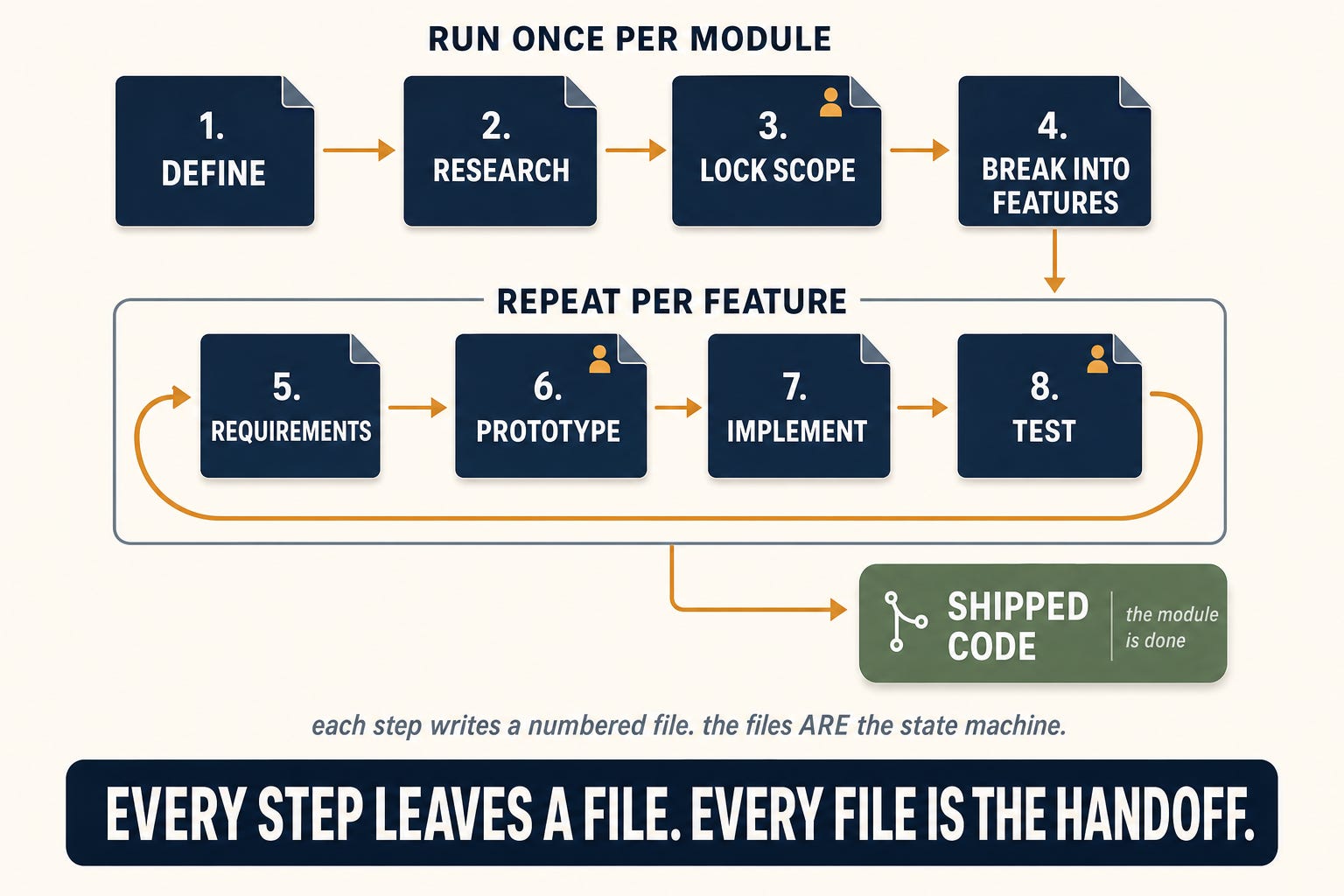
The sequence
1. Define the module
I start with `/module:00-define`. This writes a short charter: what the module is, who uses it, what already exists in the legacy system for this area, and the constraints any rebuild has to respect. It is deliberately cheap and locks nothing. No feature list, no decisions, just the problem framed clearly.
Why it matters: the framing is the whole point. For a scheduling module, that is a sentence or two: let staff manage the day’s appointments in one place, cut double-bookings, replace a clunky legacy calendar the team has outgrown. No screens, no fields. That framing gives the research a real target, and gives every later step a shared understanding of what we are building and why.
2. Research the landscape
Next is `/module:01-research`, which runs deep competitive and industry research against that charter. It reads across the whole landscape: what competitors ship, what the industry treats as table stakes, where the real opportunities are, and what our own users are actually trying to do. It proposes; it decides nothing.
This step is the easiest to underrate. Our product manager is regularly surprised by features the research proposes, and the surprise is the tell: the AI understood the user’s problem well enough to find a gap the team had missed. Weak research produces a confident module that solves the wrong problem. Strong research is where most of the value gets created.
3. Lock the scope
Then `/module:02-requirements` turns the research into a frozen scope: the capabilities the module must have, what we keep or kill from the legacy system, and the decisions every feature inside the module will inherit. This step ends with the first human gate, the freeze. Nothing expensive gets built until I confirm it, because everything after this point is built on top of it.
It is also not the AI working alone. This step runs as a working session between the AI, a developer, and the domain expert or product manager. The research did the reading; this step surfaces the decisions that steer the module: what is in scope, where the technical trade-offs are, and the judgment calls that only someone who knows the business and the customer can make. It proposes, the people in the room decide. These answers set the direction of every feature that follows, so the freeze is only as good as the people confirming it.
4. Break it into features
With scope frozen, `/module:03-feature-map` splits the module into its features and puts them in build order. It scaffolds a numbered folder per feature, ordered so that features producing data come before the features that read it.
Why it matters: the ordering is the payoff. Features are built in dependency order, so each feature’s inputs already exist by the time you reach it. The numbered folders make this self-documenting: the lowest-numbered unfinished folder is always the next thing to build. And because every capability from the frozen scope has to land in exactly one feature, nothing falls through the cracks.
Steps 1 through 4 run once. The next four run per feature, looping until the module is done.
5. Lock the feature’s requirements
Now I drop into a single feature. A larger feature gets sliced into smaller phases first, and the requirements and prototype steps run over each phase in turn. An optional `/feature:00-research` covers anything the module research did not reach. Then `/feature:03-requirements` does a codebase recon and freezes the feature’s requirements and a decision register: every decision, the recommendation, the final answer, and the reason where I overrode it.
Why it matters: like locking the module scope, this is a working session, not the AI alone. The difference is altitude. Module requirements set the high-level scope; this drops into one feature, where intent actually lives and where the AI will otherwise fill in the blanks with its own assumptions. The register that comes out of it is the contract everything downstream is checked against, which is how you catch “we are about to build the wrong thing” while it still costs a conversation instead of a rewrite. The codebase recon is the other half: it teaches the AI the unwritten conventions of this feature’s corner of the system before a line is written, so the generated code fits what is already there. This is the one step I never skip.
6. Prototype it
If the feature has a user interface, `/feature:04-prototype` builds a clickable prototype. Then comes the second human gate, the prototype review: I open it in the browser and actually use it, and `/feature:05-freeze` locks the final design once it matches what we intended. Features with no screen of their own, a pure backend or data job, skip the prototype build and go straight from requirements to a thin freeze.
Why it matters: this is where we find out what needs to change, while changing it is still cheap. The agreed prototype then becomes the contract the implementation builds against. A spec document leaves room for interpretation, and in the past that room is exactly where the work went sideways: the wrong tangents nobody caught until late. Iterating on something you can click closes that gap before any implementation starts. And the prototype is not throwaway: it is the actual production UI, so the design work done here is not redone later. (I go deep on this step in [Most “AI in a day” ships slop. This pipeline has to clear the bar first.])
7. Implement it
`/feature:06-plan` decomposes the frozen feature into implementation steps sized to fit an AI session, then `/feature:07-implement-all` works through them: it dispatches the right specialist for each step, runs review gates, and commits when things pass.
Why it matters: the size limit is what keeps the AI sharp. Each step runs in a fresh agent with clean context, so no single session has to hold the whole feature in its head. The planner refuses oversized steps before they run, which is the single biggest reason large features go wrong with AI. (That context-discipline problem, and why orchestration is what addresses it, is the subject of [Orchestration solves one AI problem. It hides another.) Splitting the work also lets the right specialist take each piece, instead of one general-purpose agent doing everything adequately and nothing well. And because every step is checked against the frozen register before it commits, the implementation cannot quietly invent scope that nobody signed off on.
8. Test it
`/test:create-scenarios` generates test scenarios from the frozen requirements, and `/test:run-scenarios` drives them against the real app.
Why it matters: code that compiles is not code that works. On a system like this, the only real test is whether the feature behaves correctly end to end, with real-shaped data, without breaking the features next to it, and that is exactly what unit tests miss. Generating the scenarios from the frozen requirements closes the loop the contract opened: the same document that said what to build becomes the checklist for whether it got built. A feature is not done when it runs. It is done when it does what it promised.
This is also where the third human gate, the ship decision, lives. The AI prepares the case: the review against the frozen register plus the scenario results. It does not get to ship. I read that and make the call.
Then repeat, feature by feature
That four-step loop runs in the build order the breakdown set: take the lowest-numbered unfinished feature from requirements to tested, then move to the next number, until the last feature exits the loop.
Because each command writes its state to a file, I never have to keep a session open to hold context. I can close everything, come back days later, and the files on disk tell the next command exactly where to start. (That handoff-through-files trick is the state machine I described in the first post.) Nothing goes stale, and nothing is lost between sessions.
Knowing where you are: `/module:status`
With several features each moving through requirements, prototype, implementation, and test, the one thing I need at a glance is where the module stands. That is what `/module:status` is for. It reads the same files the pipeline writes and prints a compact rollup: a row per feature, a glyph per step. Then it does the thing that matters more than the status itself: it hands me the literal command to paste for the next unfinished feature’s next step. I never have to remember where I left off. It writes nothing and decides nothing, so I reach for it constantly.
That is the whole spine. One module is this sequence, start to finish. The strangler-fig rewrite is the same loop run module after module, until the legacy system is gone. The sequence is fixed. The discipline is in running it every time.
I’m Adam Miles. 25 years of shipping software, including the messy brownfield kind. I write about using AI to move real codebases forward: legacy, greenfield, and the awkward middle.
If you’re rebuilding a legacy system, or thinking about it, I’m happy to compare notes.
The companion to this post:
Rebuilding a brownfield application module-by-module with AI: the strategic case for the strangler migration this sequence runs inside. If this post is the how, that one is the why.
Deeper dives on two of the steps:
Most “AI in a day” ships slop. This pipeline has to clear the bar first: a deeper look at the prototype step.
Orchestration solves one AI problem. It hides another: why context discipline is the load-bearing problem, and where orchestration helps.