

Requirements to production-grade code in a workday — gated on a 4/5 quality score against the team’s own design system, with the prototype that becomes the shipped UI, plus what it changes about how you work.
We all know AI can take a feature from requirements to production code now. That part is easy, and the demos are everywhere. So the interesting question stopped being can it build the thing and became does the thing it builds actually hit the mark, and that’s where almost everyone falls back to AI feature slop: fast, plausible, and subtly wrong in the ways that matter.
What separates slop from production-quality output isn’t the generation. It’s the discipline around it. The real unlock here isn’t speed at all, it’s that a built-in research step and a working, clickable prototype surface decisions and ideas the team hadn’t thought of yet: the edge case nobody scoped, the field that should have come from a column already in the database, the flow that only looks wrong once you click it. The prototype becomes a shared surface the whole team reacts to instead of a spec they imagine. Then a measured quality bar and human gates placed at exactly the right moments keep the output honest. Consistency with the system everything else uses isn’t a nice-to-have; it’s enforced. The day is just what’s left over once that discipline is doing its job.
Here’s what a single command produces. I run the orchestrator, walk away, and about 1.5 to 2 hours later come back to a clickable, interactive prototype and a git commit. The UI is production-quality first time, not after rounds of revision: scored above 4/5 on the quality checklist before I see it. Every screen has populated, empty, loading, and error states. The components live inside the production application, in the folder structure features ship from, using the same design system everything else uses. Zero touches between the trigger and the result.
A morning requirements session and an after-lunch team review bracket that two-hour run. After sign-off, the backend gets built and the whole feature gets tested — and on a feature that fits a common pattern, that lands the same workday too.
That same outcome used to take six to ten weeks: initial scoping, multiple rounds of static mocks, stakeholder reviews, the engineering pushback when a mock turned out to be infeasible, the rebuild as code, the iteration cycles after that. Now it lands in a workday.
Not the demo you’ve seen
Claude can sketch a prototype from a one-line prompt. That isn’t this. This pipeline runs against a real codebase with twenty years of schema behind it and walks a PM through thirty-plus grounded requirements questions before a line of UI gets generated. Domain, UX, and UI passes run until a polish reviewer scores the result 4/5 against the team’s own design contract. The output isn’t a demo of what AI could do. It’s the UI that ships in the next release.
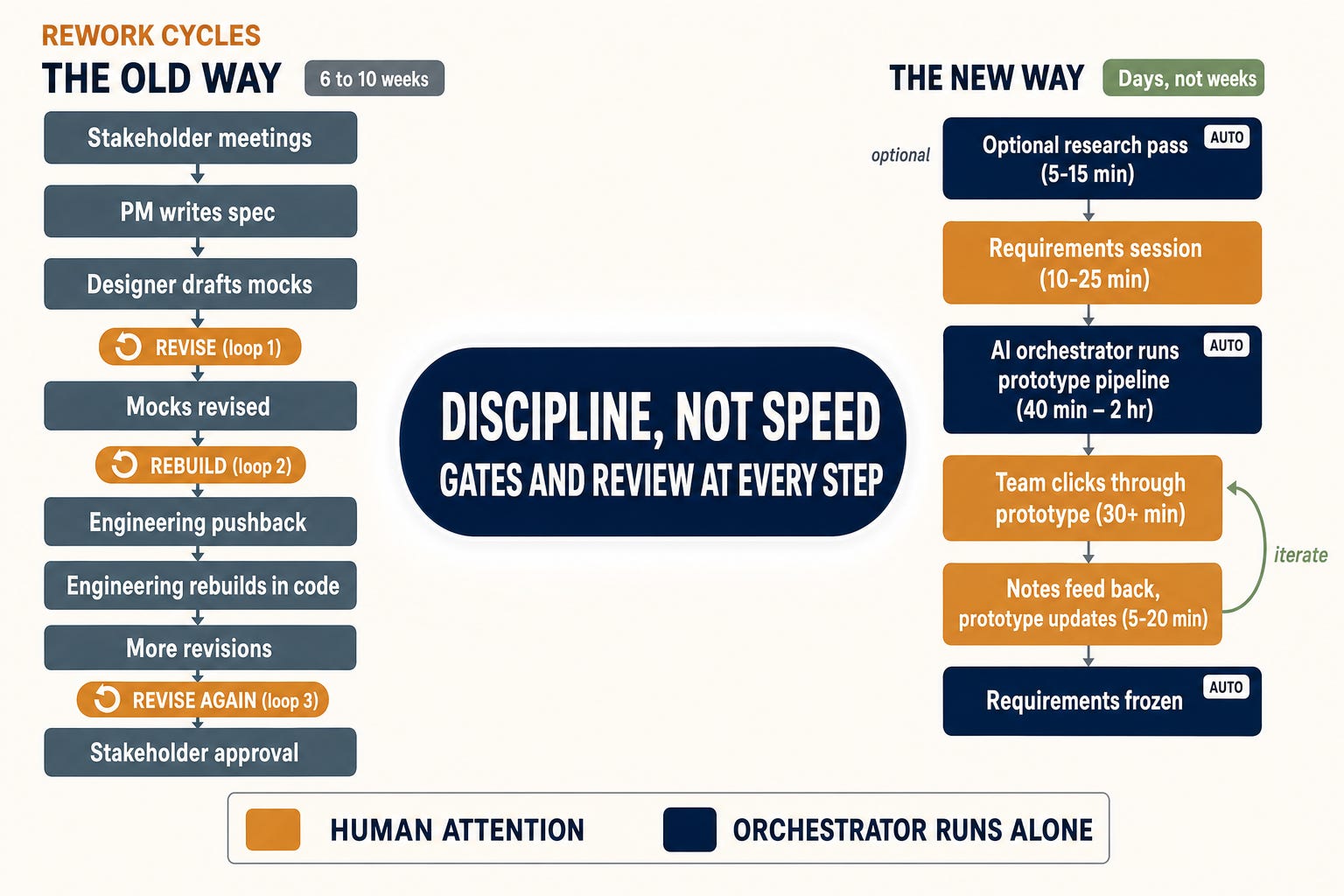
This post is how the pipeline works, what it produces, and what it changes about the way you build features.
Why the old way was the rational way
The old workflow had three load-bearing problems:
The artifact arrived late. Teams argued about static mocks for two weeks, then started over once a clickable thing finally existed.
The quality bar was vibes. “Looks good to me” is not a gate. The “approved” mock might have been brilliant, or it might have had eight UX problems nobody caught. Which one you got depended on who was in the room.
Requirements gaps surfaced mid-implementation, when fixing them cost days instead of minutes.
None of that was a mistake. It was a sensible response to a real constraint: building the artifact was the most expensive thing in the cycle, so you spent weeks studying the blueprint before anyone broke ground. The multi-week design phase was an elaborate workaround for the fact that you couldn’t cheaply try the thing before committing to it.
AI changes the economics. The artifact stops being expensive. When a single command produces a clickable, polished, real-component prototype between breakfast and lunch, the workflow inverts. Framing the house is now cheaper than arguing over the blueprint, so the rational move is to build first and decide second.
The Pipeline
One slash command kicks off a sequence of specialized AI agents, each catching what the previous pass couldn’t. Five phases, plus two half-step review passes:
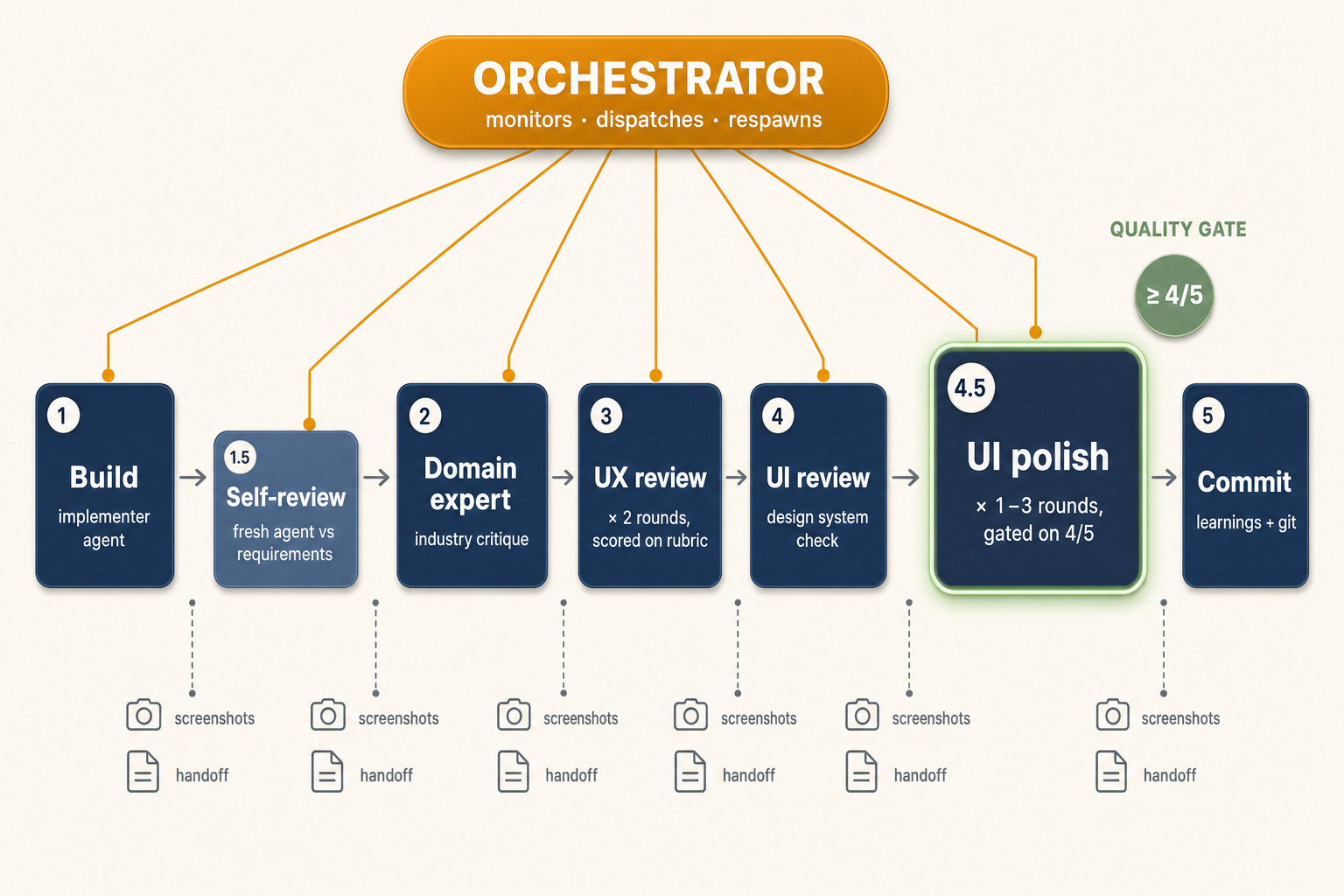
Build
An `implementer` agent reads the frozen requirements and builds the components, screens, mocked API endpoints, and a manifest of states (populated, empty, loading, error) for each screen. Between iterations, Playwright drives a real browser to screenshot every screen and state; the orchestrator runs visual sanity checks and spawns fix-up builders when anything renders blank, clips at the edges, or overlaps.
Builder self-review
A fresh implementer, with no conversation context from the original build (it still reads the code that was just committed), re-reads the requirements, looks at the screenshots, and fixes what the original missed.
Domain expert review
An agent role-playing as someone who knows the industry and the users critiques the prototype against how real users would actually do this work. The implementer applies the remediation.
UX review - two rounds
A UX reviewer scores the prototype against a rubric: flow clarity, information hierarchy, discoverability, state transitions, sensible defaults, error recovery. The implementer applies fixes. A second round runs because the first round’s fixes always introduce new problem, two rounds is the minimum that produces stable UX.
UI review
A separate agent reviews visual quality against the design system: styles used correctly, spacing consistent, typography on-spec, components matching the library. Fixes applied. Screenshots retaken.
UI polish up to three rounds, gated on a quality bar
A polish-expert agent, running on a larger model because polish requires judgment, scores every visual aspect on a 5-point scale. The loop only exits when the average is ≥ 4/5 and no individual item scores below 4 and all blocking items pass. The rubric is anchored to the design system itself: spacing tokens, type scale, component variants, color usage, the rules already encoded as the team’s design contract. It’s not subjective taste-grading; it’s spec compliance against rules the codebase already enforces.
Learnings + commit
The orchestrator captures non-obvious discoveries into a `learnings.md` file, then commits the whole prototype to git.
The result on a typical feature: a fully-reviewed, polish-gated, clickable prototype that would have taken a designer-and-developer team a week or more to produce by hand.
A walked-through example
Here’s an actual run, real numbers from one feature: a record list with an edit form, the kind of thing every product ships dozens of.
9:00am — Requirements session.
Engineer + PM. The AI walks through 32 questions, fields on the list, filters, edit-form validation rules, what happens on save, what happens on conflict, who can see what. The PM accepts about 25 of the AI’s recommendations, overrides 7 (mostly around business-rule edge cases the AI couldn’t have known). 45 minutes. Decision register saved to disk.
What makes those 32 questions sharper than a normal scoping doc: the AI has read-only access to the local database schema and data. It knows what tables exist, what columns are on them, what naming conventions the project uses. So when it recommends fields, it’s grounded in what’s actually there. A recommendation like ”surface the existing `effective_date` column from the appointments table” is qualitatively different from ”add an effective date field, somehow.” The prototype never proposes endpoints that would require schema changes nobody wants to make.
9:50am — Engineer triggers the pipeline
`/prototype:02-orchestrate-prototype`. Walks away. Goes to a meeting. Gets coffee.
11:20am — Pipeline finishes
Engineer comes back to a Slack notification, a git commit, and a dev server URL. Opens the URL. Five screens. Every screen has populated/empty/loading/error states. The list filters work. The edit form validates. The error state renders correctly when the mocked save endpoint returns a 422. Polish score: 4.3/5, all blocking items passed.
1:00pm, team review gate.
Engineer + PM + designer in a room, dev-server URL on the shared screen. They click through. About 30 minutes of real use. Three things surface, and none of them are AI mistakes. They’re decisions that sounded right in the requirements session and now, in front of the working artifact, are obviously the wrong call: an empty-state CTA that prompts the wrong action, a “save and continue” button nobody actually wants, an “effective date” field that turns out to mean two different things. The kind of thing that used to cost a team weeks because nobody notices until the feature is built. Here, it’s a comment on a prototype.
1:30pm, notes go back into the pipeline.
Each change can run as its own one-shot iteration or batch together with others, and the team can cycle through review-and-iterate as many times as the prototype warrants. Simple features land in one pass. Denser or more ambiguous ones go two or three. This team batches and runs one pass. 20 minutes later the prototype is fixed, screenshots retaken, polish bar re-cleared. The “effective date” ambiguity gets written into the final requirements freeze as two separate fields.
2:00pm, requirements frozen.
Engineer runs the next command in the chain. It splits the backend work into right-sized phases against the API contracts the prototype already implied, and a separate orchestration takes over to write the database changes, the endpoints, and the tests. That run takes 30 to 90 minutes.
2:40pm, discovery first.
Before any scripted testing, the engineer points an exploratory agent at the new feature and lets it loose with no test plan. It works the screen the way a curious new user would: it pokes at every button, field, and menu, tries the odd path nobody specified, and watches for anything that errors or behaves wrong. This pass isn’t grounded in the requirements on purpose — it’s hunting for the problems nobody thought to write a test for. What it finds gets collected into one batch, ranked worst-first. Then it stops and asks. And here the engineer’s whole job is one decision: skim the list and tick which bugs to fix. That’s it. From there the agent takes each approved bug, writes the fix, applies it, and then re-runs the exact steps that triggered the bug to prove the fix actually worked — and only reports back the ones it has confirmed resolved. The human supplies the judgment about what matters; the AI does all of the how, including grading its own work.
3:10pm, the grounded test pass.
Running discovery first wasn’t arbitrary. It clears the rubble — the dead buttons and broken paths — so that when the grounded pass runs, anything it flags is a real gap against the requirements, not a symptom of some obvious breakage drowning out the signal. Now a second test command goes the other direction: it reads the frozen requirements and writes out the full list of scenarios the feature is supposed to satisfy, then works through most of them on its own: the screen-level checks by driving a real browser, the data-level checks by querying the live database. Where the discovery pass hunted for the unknown, this one confirms the known. Every requirement the team signed off on becomes a concrete, repeatable test that reruns for free from then on. The few scenarios that genuinely need human judgment are flagged as such, and the engineer works through that short list before the feature is called done.
Maybe 90 minutes of actual human attention across the day. The team walks out with a frozen spec, a clickable prototype that matches it, and a backend implementation already running against the approved contracts.
The contrarian claim: the prototype is the production UI
When most teams say “prototype,” they mean a throwaway approximation: a Figma mock, a click-through, or at best a coded mock in Storybook. The mock gets approved. Then someone rebuilds it as production code. The build phase is essentially the second time the same UI gets made.
That’s not what happens here. The components I build in the prototype phase are the components that ship to production. They live inside the application itself, in the same folder structure features ship from, using the same design system tokens production components do. There is no second build. The “prototype” label refers to the backend layer: API endpoints are mocked, no database is involved, data shapes are honest but the implementation is disposable. The frontend is production-grade from day one.
When implementation begins, the diff between “prototype” and “production” is concentrated in the data layer. A `mockApi.getBookings()` call becomes `api.getBookings()`, returning the same shape the prototype was already rendering. Same component tree. Same styling. Same behavior. The thing the team approved in thtotype review is what ships.
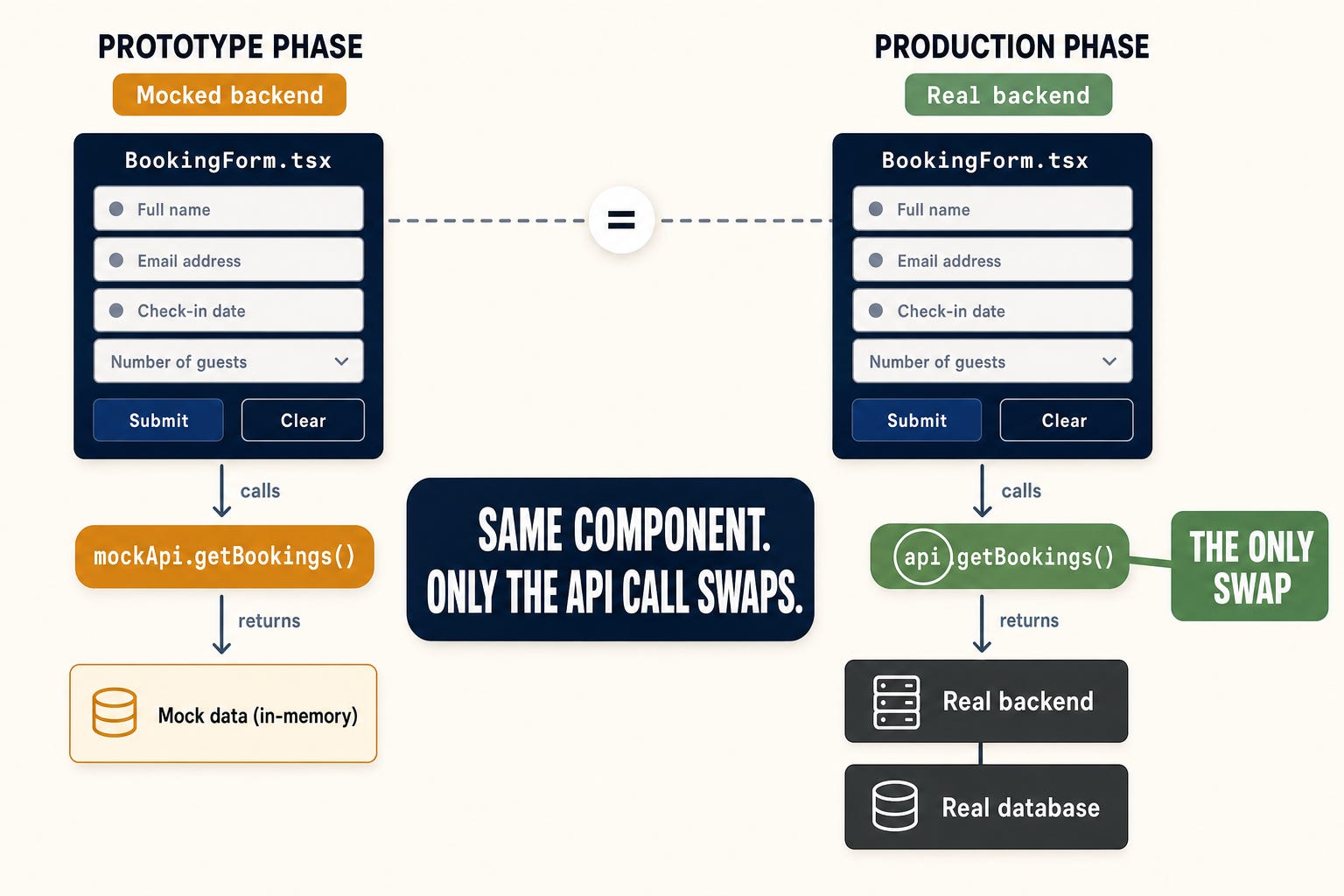
This matters for two reasons:
1. The 4/5 polish bar is also the production bar. In the usual flow, prototype polish doesn’t carry forward, and production has to clear a separate bar under time pressure. When the prototype passes the polish loop here, it’s not “good enough for review.” It’s “good enough to ship.”
2. There’s no second design-and-rebuild cycle.The gap between “prototype approved” and “UI ready for real APIs” is the time it takes to swap the API layer. Often a single day. Sometimes hours.
Past the prototype: trusting the code AI writes
A polished prototype is the easy thing to believe. The hard sell is the backend. Show a skeptical engineer a clean UI and they’ll grant you the UI. Tell them an AI wrote the migrations, the stored procs, and the endpoints against a database with twenty years of schema behind it, and the trust evaporates, and they’re right to be cautious. So this is the part that has to earn it, and it earns it two ways.
The interesting decisions are already made, so the backend is a fill-in, not a design problem. By the time backend work starts, the approved prototype has already pinned the contracts. The form renders these fields, so the endpoint returns these fields. The list filters on these columns, so the query takes these parameters. Nobody is in a room negotiating what an endpoint should look like, because the prototype the team signed off on already answered that — in a shape grounded in real schema from the very first requirements question. What’s left isn’t the creative part of backend work; it’s the mechanical translation of a settled contract into migrations, procs, and endpoints. That’s exactly the kind of constrained, well-specified work an orchestration of agents is good at, and exactly why it can run unattended in under 90 minutes.
You don’t trust the output by reading every line. You trust it because of how it’s verified. This is the real answer to the skeptic. The two test passes pull in opposite directions on purpose: the requirements-blind discovery pass proves the feature doesn’t break in the ways nobody anticipated, and the grounded pass proves it does everything the team explicitly asked for. What survives both isn’t “code an AI wrote and a human skimmed.” It’s code measured against the requirements and the real world, and every one of those checks becomes a permanent, replayable test that re-runs for free on the next change.
That’s the whole trust argument in one line: the contracts make the backend cheap to build, and the two-sided verification makes it safe to ship — without anyone pretending they read every generated line and understood it.
What this changes about how you work
Who does what in the new flow
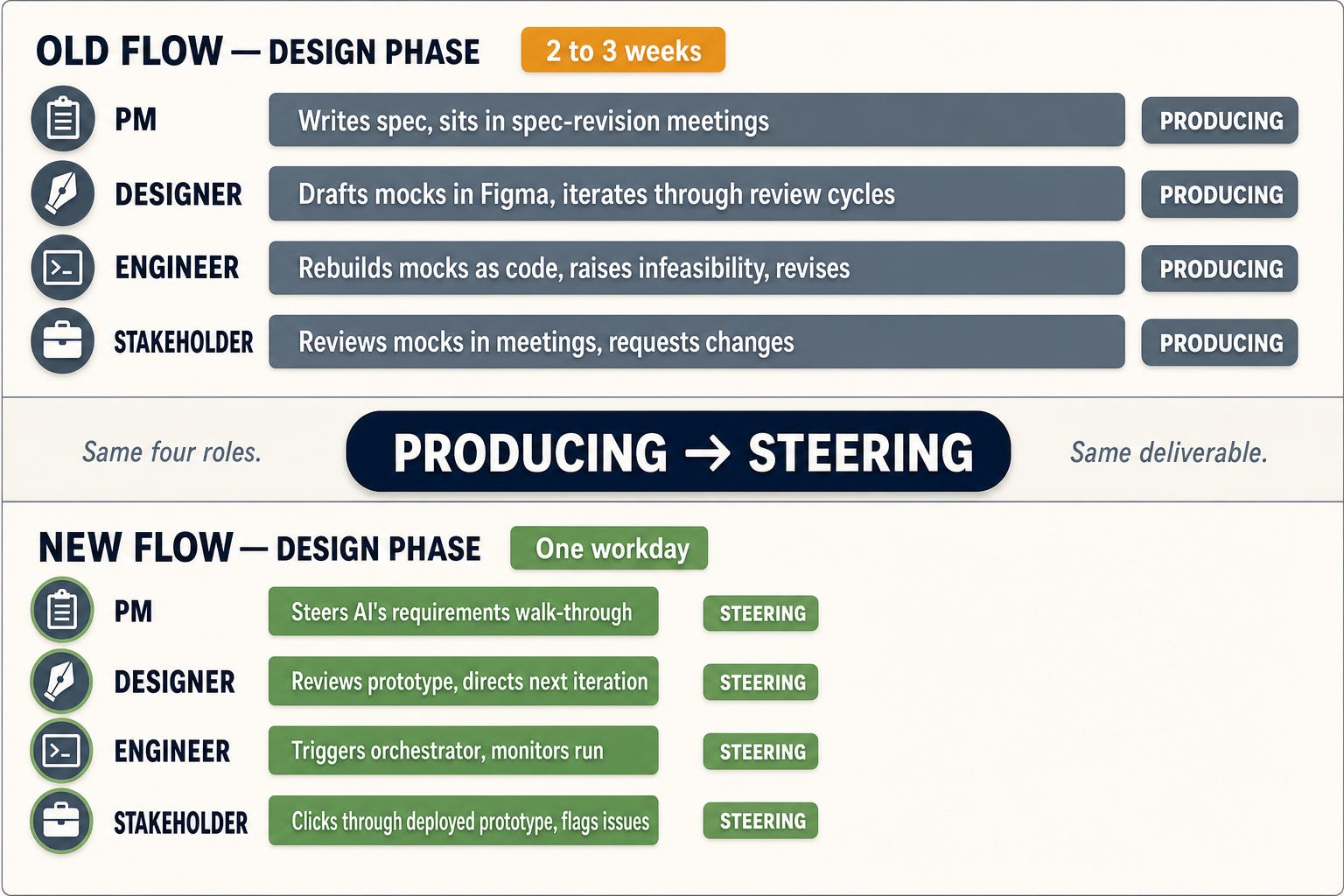
Once the artifact is cheap and the polish bar is the ship bar, the human work changes shape. The design-phase roles become foreman work, not trade work: PM, engineer, and stakeholder all shift from producing the design artifact to steering the one the AI produces. Expertise gets applied to a working artifact instead of an imagined one:
Engineer: owns the requirements pass with the PM, triggers the orchestrator, shepherds the prototype to the review gate. A workday to first prototype in place of multi-week revise-and-rebuild cycles. More features designed per quarter.
PM: drives the requirements conversation directly, making the high-judgment calls (business rules, edge cases, what the customer actually needs) instead of authoring a long-form spec that gets reinterpreted downstream. Their judgment lands on the artifact the team approves.
Stakeholders: click through the deployed prototype the same way they would click through a shipped feature. Feedback grounded in actual use, not in imagining what a mockup might feel like.
Teams with a dedicated designer plug them into the human review gate: applying taste to a working prototype, directing the next iteration, catching the emotional-resonance and cultural-fit calls that a checklist-based AI review won’t. Same roles, same names, more time on the work that needed their judgment.
The order of operations flips
Roles aren’t the only thing that rearranges. The sequence of decisions does too. Three categories that used to happen before the prototype now happen in front of it:
Requirements get a first pass before the prototype, enough to give the build agent something to work from, then freeze after the team has clicked through and surfaced the real gaps. ”That flow doesn’t make sense; this field should have been on the other screen; what happens when a user does X-then-Y, we never thought about that.” The prototype isn’t a downstream artifact of requirements. It’s a tool that produces better requirements.
UX is exempt from the requirements phase entirely. No modal-vs-drawer debates upstream of the artifact. By the time the prototype reaches the team they’re reacting to a thing, not debating an idea.
API shape comes out of the components the AI builds, not the other way around. By the time the backend orchestration kicks off, the contracts are already pinned, and a separate set of AI agents implements them.
The pattern across all three: judgment used to be applied to the imagined version of the thing. Now it’s applied to the working one.
The honest trade-offs
Compressing a whole feature into a day has real costs. The ones worth flagging:
The UX-reviewer has limits. Emotional resonance, cultural sensitivity, accessibility nuances the checklist doesn’t catch: these require human review. The human review gate is where those get caught. Don’t skip it.
The prototype is only as good as the requirements. The requirements command walks the team through structured questions and doesn’t move on until each one has a concrete answer. The team’s job is showing up and answering questions, not authoring a 40-page PRD.
The workday timeline assumes scaffolding is in place. If you’re starting from scratch (no orchestrator, no review checklists, no design-system tokens, no requirements pipeline), that’s a few days of work before the first prototype lands in a day.
This works best for features that fit common patterns, which is most of them. Booking screens, record lists, edit forms, multi-step wizards: probably 95% of the features any product needs to ship are well-understood patterns, and the pipeline produces strong output on every one of them. The remaining 5% (genuinely novel interactions: multi-touch gestures, real-time collaboration, anything without a category prior) require more human steering during the review rounds.
What I’d tell a team thinking about this
Three things hold up across every team I’ve watched try this:
The AI needs explicit acceptance criteria, or it grades on vibes. Vague review prompts produce vague reviews. Specific criteria (spacing tokens, type scale, empty-state coverage, error-recovery flows) produce specific, actionable ones. Build the criteria first. The rest of the pipeline is in service of them.
Teams who skip the human review break. Between 15 and 40 percent of features hit a “wait, that’s not quite right” moment at the gate, and those moments almost always surface a missed assumption in the requirements. The AI produces a strong default; the human’s job is the editing pass that turns the default into the right answer.
Don’t make the prototype pipeline handle everything. It’s a single-feature tool, not a system-design tool. Cross-feature flows, multi-screen state machines, third-party integrations: those still need real design work upstream.
I’m Adam Miles. 25 years of shipping software, including the messy brownfield kind. I write about using AI to move real codebases forward: legacy, greenfield, and the awkward middle.